Aktualizacje Brief Brand
Custom Analytics: 200+ Seller Central metrics, switch off Business Reports by year-end
Amazon publikuje komunikaty Seller Central i Ads po angielsku. Brief poniżej zostaje po angielsku, by nie zgubić źródła. Przegląd, formularze i polityki są w Twoim języku. Potwierdź liczby w Seller Central.
Who it hits
US Brand Registry catalogs still living in old Business Reports. Anyone whose weekly founder note is a CSV from Reports → Business Reports.
What to do this week
Open Custom Analytics this week. Recreate the Business Reports you actually use as a dashboard before Amazon’s year-end switch. Do not dump Top Search Keywords into broad. Harvest is still the paid search-term report.
What this is — and what it is not
| Console | Job | Year-end clock |
|---|---|---|
| Custom Analytics (Seller Central / Brand Analytics) | Sales, traffic, search, inventory, reviews. Dashboard builder. Default board: Overall Business Performance. | Amazon says switch off Business Reports by year-end. Confirm the live date. |
| Unified reporting (Amazon Ads) | Sponsored + DSP campaign reports. | Legacy Sponsored Ads / DSP report pages sunset 31 Dec 2026. Different console. See the Ads sunset brief. |
| Search-term report (Ads) | Queries you already paid to test. | Does not move. Still the harvest vote. |
If you treat Custom Analytics as “the new search-term report,” you will promote category folklore into exact. If you treat it as “I can ignore Business Reports until January,” you will lose the weekly export you actually read. Both mistakes are avoidable this week.
What the default board is for
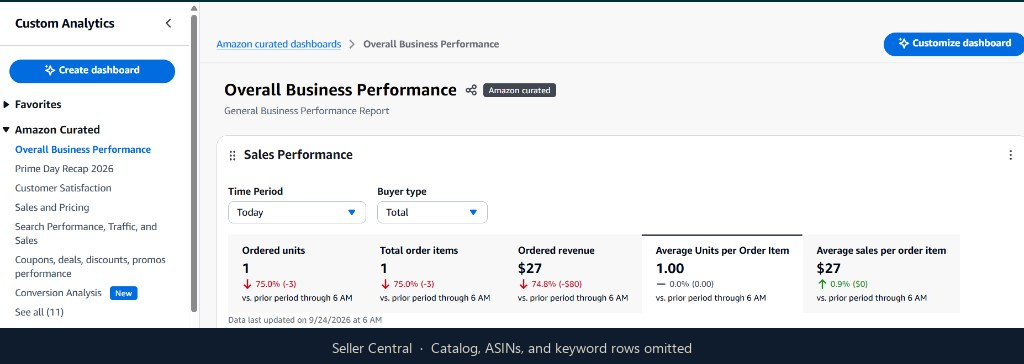
The factory dashboard is Overall Business Performance. You can create others. On a live US account the default layout is: Sales Performance (ordered sales, orders, units, conversion), Units vs Sales, Business Repeat YoY, then widgets Amazon will show for Top Performing ASINs, Promotions Snapshot, and Top Search Keywords. Those last three are useful. They are also how a public screenshot leaks a catalog. We cropped them off this page.
| Widget | Honest use | Kill it as a bid input if |
|---|---|---|
| Sales Performance / Units vs Sales | Did units move with sales, or did price/mix do the work? | You raise CPC because “sales look soft” without checking stock or Buy Box. |
| Business Repeat YoY | Are you retaining buyers, or renting them every week? | You call YoY repeat a ROAS target. It is not. |
| Top Performing ASINs | Which children actually moved. Pause ads on a hero that died. | You advertise the parent and never split the dud child. |
| Top Search Keywords | Candidate list of queries Amazon will show you | You paste the board into broad. Harvest remains the paid search-term report. |
| Promotions Snapshot | Whether a deal is actually attaching | You scale exact into a coupon that already sank contribution. |
PPC implication
Custom Analytics is a listing and inventory read that sits next to ads. It does not set bids. Conversion in Sales Performance that is weak while clicks are fine is still a page or offer problem — same rule as Search Query Performance. Units falling while ads spend is a stockout or lost Buy Box until proven otherwise. Top Search Keywords are not a license to skip negatives.
This week
- In Seller Central, open Brand Analytics → Custom Analytics (confirm the live path). Load Overall Business Performance.
- List every Business Reports export the desk still uses. Recreate each as a Custom Analytics dashboard or saved view. Run both in parallel for two weeks.
- Overlay last week’s paid search-term harvest. Promote converters. Negate junk. Do not import the Top Search Keywords board into exact.
- Put the year-end switch on the same calendar as the Ads unified-reporting sunset — two consoles, one December. Confirm both dates live. Do not assume they are the same day.
Weekly harvest SOP: search-term harvest. SQP method: SQP weekly read. Workstream: Brand Analytics & SQP.
Source: in-console Custom Analytics notice and the live Overall Business Performance board. Confirm metrics, access (Brand Registry), and the year-end switch date in Seller Central. This page is the operating method, not Amazon’s help article.
FAQ
Is Custom Analytics the same as Amazon Ads unified reporting?
No. Custom Analytics is Seller Central (sales, traffic, search, inventory, reviews). Unified reporting is the Ads console. Both have a year-end clock. Confirm each date separately.
Do I need Brand Registry?
Brand Analytics sits behind Brand Registry on most accounts. If you cannot see Custom Analytics, you still have Business Reports and the paid search-term report. Do not fake a board you cannot open.
Should I bid the Top Search Keywords widget?
No. That board is a candidate list. Exact only after the query converted in the search-term report. Dumping it into broad is how ACOS creeps.
When is Business Reports actually switched off?
Amazon’s in-console copy is switch by year-end. Read the live notice in your account for the date. Do not wait for a reminder email in December.
Source: Seller Central: Brand Analytics → Custom Analytics (confirm live) · Confirm live numbers in Seller Central. This desk is the method, not a rate card.
Stuck on this change?
I will walk the public listing, say whether this change is leaking spend, and what week one would be.